
Sites.Read.All is possibly the most dangerous permission you’ve never heard of. One client secret, one Graph API call, and an attacker has read access to every SharePoint site and OneDrive in your organization - including personal folders employees assume are private.
Microsoft continues to improve secret scanning capabilities for Azure resources, which is great for finding leaked credentials in public repos. Organizations everywhere, however, regularly create Azure AD application registrations with Graph API permissions for legitimate automation purposes - SharePoint indexing, compliance scanning, backup solutions, and more. Many of these apps request Sites.Read.All because it’s easier than requesting granular permissions.
The Governance Problem
When auditing Azure AD app registrations, you’ll often find applications with Sites.Read.All and Files.Read.All permissions. At first glance, these sound reasonable - applications need to access SharePoint sites for legitimate business purposes. Reading the Microsoft Graph permissions reference, however, reveals what “All” actually means.
It means ALL. Every site, every user’s OneDrive, every personal folder in the organization.
This isn’t hyperbole. Sites.Read.All as an application permission (not delegated) grants access without user context. The service principal doesn’t impersonate a user - it operates as itself, with organization-wide reach. In a 5,000-employee company, that’s 5,000 OneDrive accounts, every team SharePoint site, every confidential HR repository, every M&A due diligence folder.
The applications themselves might be well-designed and serve legitimate purposes. But the credentials? Often stored in configuration files, environment variables, or shared team documentation. And here’s the governance problem: when was the last time you rotated those secrets? Do you know everyone who’s ever had access to them? What happens when a developer who knew those credentials leaves the company?
If those credentials leak - compromised laptop, former employee, accidentally committed to a repo, stolen backup - the attacker gets read access to the entire organization’s document stores. And unlike user credentials, there’s often no offboarding process for service principal secrets.
Azure AD’s Client Credentials Flow works simply: credentials in, token out, full API access enabled. No user interaction. No MFA. For most organizations: no conditional access policies on service principals.
| |
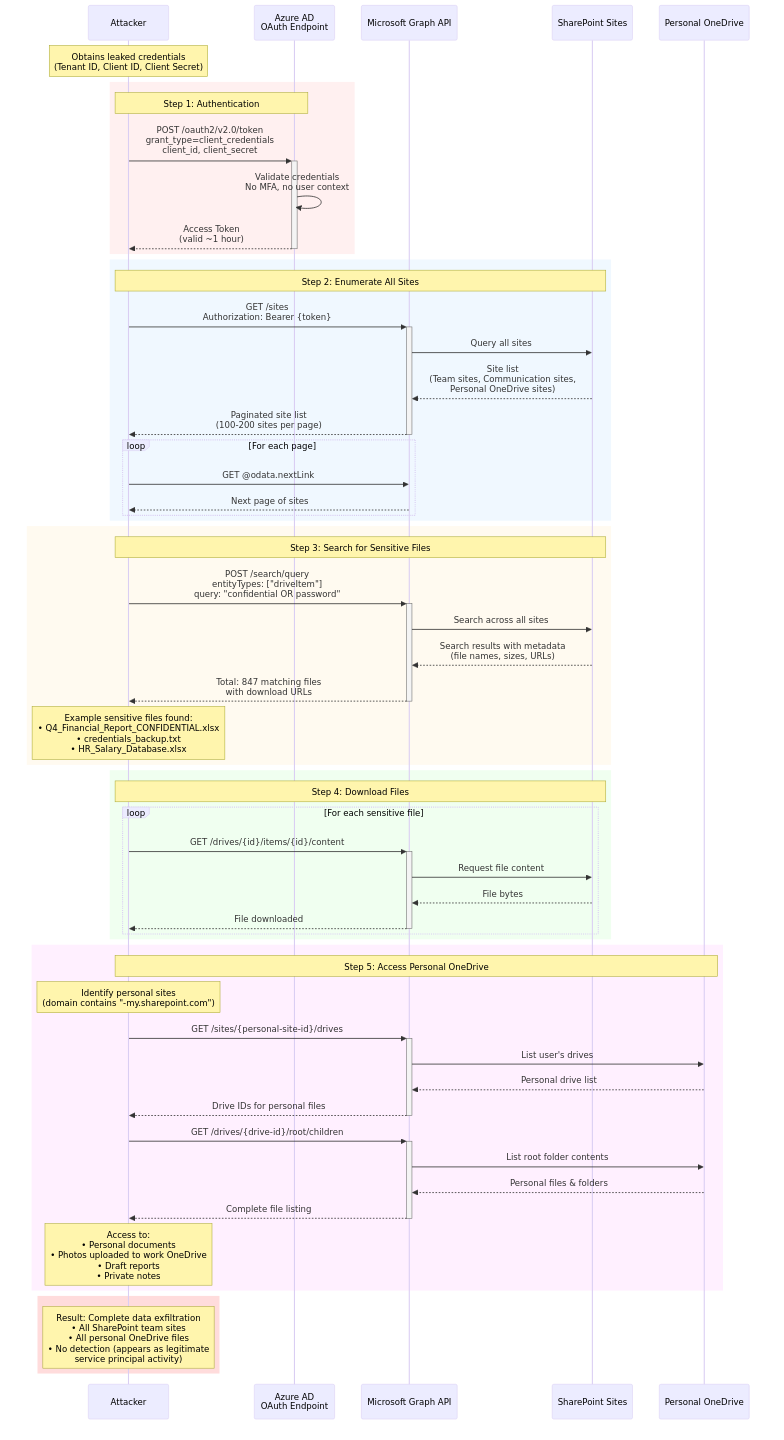
What “Sites.Read.All” Actually Enables
Once you have a valid access token, the Microsoft Graph API becomes a search engine for corporate documents. Here’s what’s accessible with a single API call:
| |
Personal OneDrive sites show up in the enumeration too - employees’ personal “My Files” sections, not just shared team content. That “private” folder where the CFO keeps compensation spreadsheets? Accessible. The HR director’s draft termination letters? Accessible. The engineer’s personal notes about job interviews elsewhere? Accessible.
The permission name uses sanitized corporate language. “Sites.Read.All” sounds administrative, boring, necessary. What it actually means: unlimited read access to every document your organization has ever created or stored in Microsoft 365.
The implementation is usually optimized for legitimate purposes: compliance scanning, data classification, backup automation. But the uncomfortable governance questions remain: Who knows this client secret? The original developer, the person who debugged it at 2 AM, the contractor who set up the pipeline, whoever has access to the shared password manager.
When was it last rotated? If the answer is “18 months ago,” you have an 18-month window of potential exposure.
What happens when someone leaves? User accounts get disabled within hours. Service principal secrets keep working until expiration - potentially 2 years away.
This isn’t hypothetical. Ask your Azure AD team: “For each app registration with Sites.Read.All, who currently knows the client secret?” Watch them struggle to answer.
Why This Matters
Consider the attack surface:
- Scope Creep: “Just give it Sites.Read.All so we don’t have to keep adding new sites” becomes the default
- Long-Lived Credentials: Client secrets valid for up to 2 years
- No Offboarding: Service principals invisible to HR-driven offboarding workflows
- Knowledge Diffusion: After 6 months, asking “who knows this secret?” is archaeology
- Audit Limitations: An attacker could blend in with legitimate automation for weeks
- Lateral Movement: SharePoint contains org charts, VPN guides, network architecture, password management docs
The Solution: Governance First
There isn’t one magic fix, but the solution starts with governance, not just technology. Before implementing technical controls, establish basic governance: inventory service principals, document who owns them, and add secret rotation to your offboarding process.
Technical controls:
Managed Identities: If your application runs in Azure, use Managed Identities. Azure handles the credential lifecycle - no secret to leak.
Least Privilege: Use Sites.Selected instead of Sites.Read.All and explicitly grant access to specific sites.
Secret Rotation: Automate monthly rotation via Graph API.
Monitoring: Enable Microsoft 365 audit logs. Alert on unusual Graph API patterns - sudden increases, access to unusual sites, enumeration patterns.
Key Vault: Never store secrets in .env files. Azure Key Vault provides access logging, versioning, and network isolation.
Workload Identity Conditional Access: Microsoft now offers policies for service principals (preview) - restrict sign-ins by IP, location, or risk level.
Testing Your Exposure
If you want to understand your exposure (authorized testing only):
| |
Run this and see exactly what someone with leaked credentials could access.
What To Do Now
The permissions system works as documented. The API behaves as designed. The problem is that “technically correct” and “practically secure” are not the same thing.
If you have applications with Sites.Read.All or Files.Read.All:
- List them all - You probably have more than you think
- Ask who knows the secrets - The answer will be “we’re not sure”
- Check your offboarding checklist - Service principal rotation probably isn’t on it
- Pick one to start with - Move it to Key Vault, enable rotation, add to offboarding
- Then do the rest - One per week is better than never
Because somewhere, a developer who left 6 months ago still has those credentials in a .env file on their personal laptop. And that laptop might be running an outdated VPN client. And their home WiFi might not have WPA3 enabled. And they might be frustrated about how their exit interview went.
The technical vulnerability is real. But the governance gap is what makes it exploitable.
Related reading: